Claude · Ad creative
How to Make Ad Creative in Claude
Connect PixelMCP to Claude and you can make ad creative by describing what you want. The images appear in your conversation, ready to download. Produce many ad variations for Meta, Google and TikTok with different hooks, angles and formats, then test what works. Your AI assistant writes the copy and PixelMCP makes the visuals.
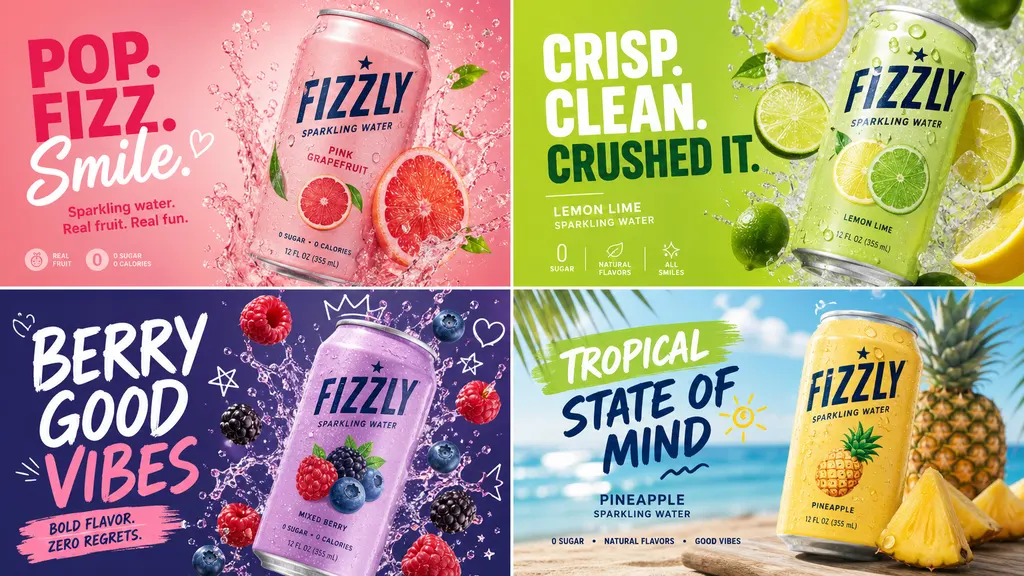
1. Connect PixelMCP to Claude
This takes about a minute and you only do it once.
1. Open connector settings
Go to Customize → Connectors, click + and choose “Add custom connector”. On Team or Enterprise, an owner first adds it under Organization settings → Connectors.
2. Add the server
Name it PixelMCP and paste this server URL:
https://pixelmcp.com/mcp3. Sign in
Click Connect. A window opens where you sign in to PixelMCP and approve access.
4. Turn it on in a chat
In a conversation, click + (lower left) → Connectors and make sure PixelMCP is switched on.
Menus change often. If something doesn't match, see the full Claude guide.
2. Ask Claude for ad creative
“Ad for our running shoe: mid-air sneaker bursting through coloured paint powder, 1:1.”
“Five ad variations for our meal kit, each with a different hook in the headline.”
“Retargeting ad showing our app on a phone with the text “Pick up where you left off”.”
3. Pick the right model
GPT Image 2
OpenAI's image model at medium quality. Great text rendering and layouts.
Nano Banana 2
Previous Google Flash model with strong prompt following and legible text. Nano Banana 2.1 is newer and cheaper.
FLUX.2 Pro
Photorealistic product and lifestyle shots with natural lighting.
See every model ranked in best AI model for ad creative.
Tips
- Ask your assistant to write several hooks first, then generate one image per hook.
- GPT Image 2 is strongest at headline text inside images.
- Generate 1:1, 3:4 and 9:16 versions of each concept for every placement.
FAQ
Can Claude make ad creative?+
Yes, once PixelMCP is connected. Claude writes the prompt and PixelMCP generates the images with models like GPT Image 2. The images appear right in your chat.
Which model should I use for ad creative in Claude?+
Start with GPT Image 2: openAI's image model at medium quality. Great text rendering and layouts. Name the model in your message, or let Claude choose.
How much does it cost?+
From $0.11 per image with the recommended models. Pay as you go with credits that never expire. New accounts get 100 free credits.
What do I need to use PixelMCP in Claude?+
Any Claude plan (Free is limited to one custom connector). Set it up on the web or desktop app; it syncs to mobile.