ChatGPT · YouTube thumbnails
How to Make YouTube Thumbnails in ChatGPT
Connect PixelMCP to ChatGPT and you can make YouTube thumbnails by describing what you want. The images appear in your conversation, ready to download. Make bold YouTube thumbnails and Shorts covers with readable headline text, right inside ChatGPT, Claude or Gemini. Ask for several versions with different hooks, then pick the one most likely to get clicks.
1. Connect PixelMCP to ChatGPT
This takes about a minute and you only do it once.
1. Enable developer mode
Go to Settings → Security and login and turn on Developer mode.
2. Create the plugin
Open Plugins and click +. Name it PixelMCP, choose OAuth for authentication, and under Connection paste this MCP server URL:
https://pixelmcp.com/mcp3. Sign in
Sign in to PixelMCP and approve access, then review the tools ChatGPT found.
4. Use it in a chat
Start a new chat, open the + menu → Developer mode, and pick PixelMCP. ChatGPT asks you to confirm before each generation.
Menus change often. If something doesn't match, see the full ChatGPT guide.
2. Ask ChatGPT for YouTube thumbnails
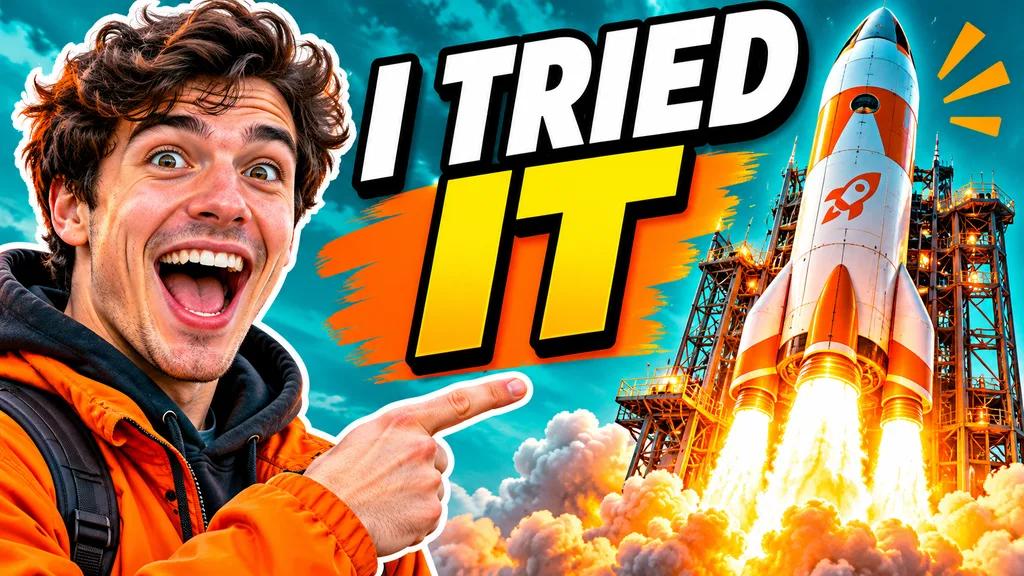
“16:9 YouTube thumbnail: shocked creator on the left, a giant glowing rocket on the right, big text “I TRIED IT”, high contrast.”
“Four thumbnail variations for my video “I cooked every McDonald's item at home”, each with a different hook.”
“Vertical 9:16 YouTube Shorts cover for a Minecraft build video, bright colors, 3 words of text max.”
3. Pick the right model
GPT Image 2
OpenAI's image model at medium quality. Great text rendering and layouts.
Nano Banana 2
Previous Google Flash model with strong prompt following and legible text. Nano Banana 2.1 is newer and cheaper.
Seedream 5.0 Pro
Rich, cinematic imagery and bold stylised visuals.
See every model ranked in best AI model for YouTube thumbnails.
Tips
- Keep text to three to five words. Thumbnails are viewed small.
- GPT Image 2 spells headline text most reliably.
- Use 16:9 for videos and 9:16 for Shorts covers.
- Ask your assistant to write five hooks first, then make one thumbnail per hook.
FAQ
Can ChatGPT make YouTube thumbnails?+
Yes, once PixelMCP is connected. ChatGPT writes the prompt and PixelMCP generates the images with models like GPT Image 2. The images appear right in your chat.
Which model should I use for YouTube thumbnails in ChatGPT?+
Start with GPT Image 2: openAI's image model at medium quality. Great text rendering and layouts. Name the model in your message, or let ChatGPT choose.
How much does it cost?+
From $0.17 per image with the recommended models. Pay as you go with credits that never expire. New accounts get 100 free credits.
What do I need to use PixelMCP in ChatGPT?+
A Plus, Pro, Business, Enterprise or Edu plan on the web. Workspace admins may need to allow developer mode.